In an era where convenience and security go hand-in-hand, the traditional key often feels like a relic of the past. Fumbling for keys in the rain or wondering if you remembered to lock the door while miles away is no longer the standard. Enter the smart door lock – a revolutionary device that seamlessly blends advanced technology with robust security, offering unparalleled peace of mind and effortless access to your home. But with a myriad of options flooding the market, how do you sift through the hype to find the Best Smart Door Lock that truly fits your lifestyle? As specialists at JTDNC.com, we’re here to guide you through every nuance, ensuring you make an informed choice for your home’s security upgrade.
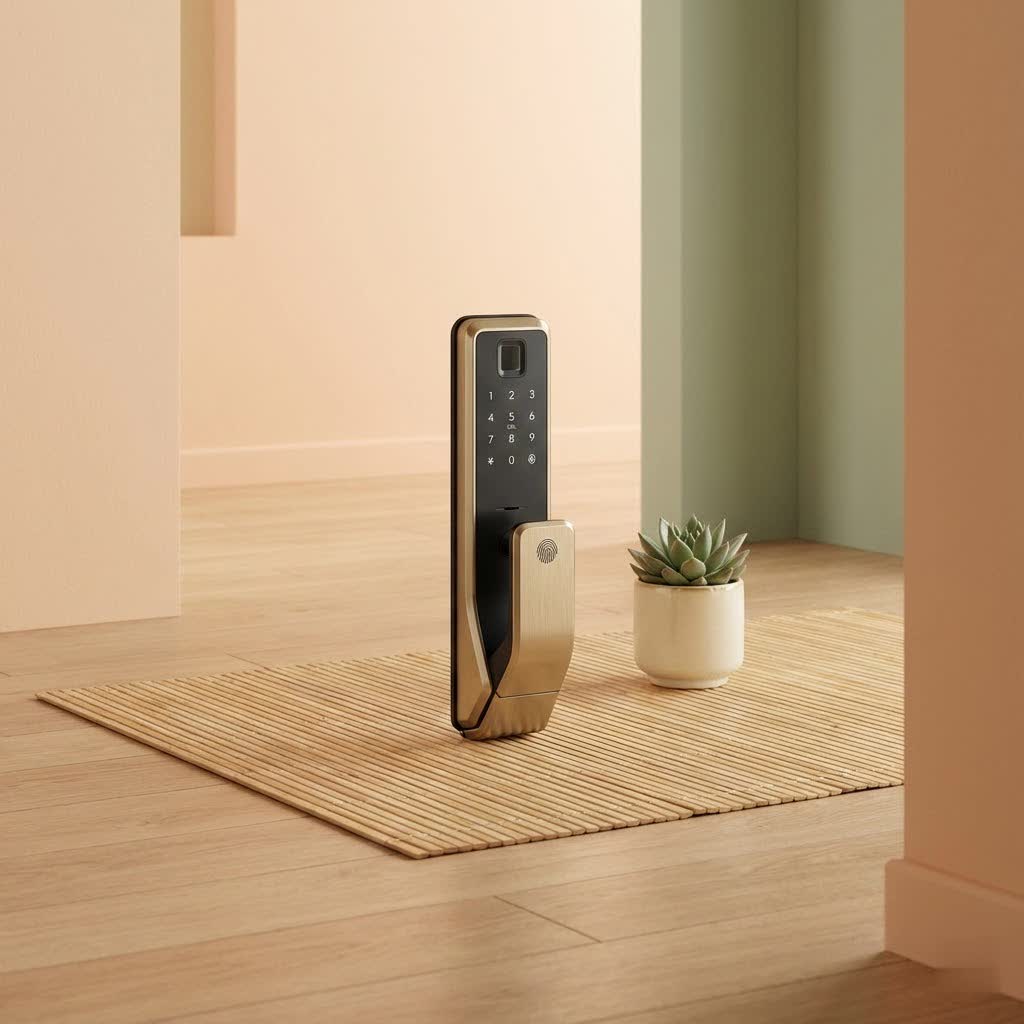
What Makes a Door Lock “Smart”? Understanding the Core Technologies
At its heart, a smart door lock transforms your entryway from a simple mechanical barrier into a connected, intelligent guardian. This transformation is driven by several key technological components that enable remote control, diverse entry methods, and real-time monitoring.
Connectivity: The Lifeline of Your Smart Lock
The ability of a smart lock to communicate is paramount, and various protocols offer different strengths:
- Wi-Fi: Many of the best smart door locks, like the Schlage Encode, feature built-in Wi-Fi, allowing you to control your lock from virtually anywhere with an internet connection without needing an additional hub. This direct connection makes remote management incredibly convenient, letting you lock or unlock your door, check its status, or even set up temporary access codes whether you’re at work or on vacation.
- Bluetooth: Ideal for simplicity and lower power consumption, Bluetooth smart locks connect directly to your smartphone when you’re within close proximity (typically 20-30 feet). They often don’t require a hub for basic functions, making them a great choice for those who primarily need convenience at their doorstep.
- Z-Wave and Zigbee: These protocols are staples in comprehensive smart home ecosystems. While they require a separate hub to connect to your home network, they offer excellent range and mesh networking capabilities, allowing your smart lock to integrate deeply with other smart devices, from lights to thermostats.
- Matter: The emerging Matter standard aims to unify smart home devices, promising even greater compatibility and ease of integration across different platforms. Looking for Matter support can future-proof your investment in a smart lock.
|
Our Picks for the Best Smart Lock in 2026
As an Amazon Associate I earn from qualifying purchases.
|
||
| Num | Product | Action |
|---|---|---|
| 1 | ULTRALOQ Bolt Smart Lock, Built-in Wi-Fi, Matter Over Thread, Works with Apple Home, Alexa, Google, 7-in-1 Keyless Entry Deadbolt with Fingerprint ID, App, Keypad, Remote Control, 18 Months Battery |

|
| 2 | Smart Door Handle Lock with Keypad: Yamiry Fingerprint Smart Knob - Keyless Entry Digital Lock for Front Door - Deadbolt with APP - Generate Passcode Remotely - DIY Installation |
|
| 3 | 3D Face Recognition Smart Door Lock with Lock Body, Fingerprint/Ic Card/Password/Key Unlocked/Camera and Doorbell/Tuya WiFi App/Night Vision/Door Opening Record/Photo/Anti-Prying Alarm. |
|
| 4 | Wyze Palm Lock, Smart Door Lock with Palm Vein Recognition, Keyless Entry Smart Locks for Front Door, Keypad, Auto Lock, Dual Battery, Wi-Fi, Works with Alexa & Google, BHMA, IP53, Mechanical Key |
|
| 5 | Video Smart Lock S398, 4-in-1 Camera + Video Doorbell + Fingerprint Keyless Door Lock + Indoor Display Monitor, Smart WiFi Deadbolt, App Remote Control, Easy Installation, Chime Included |
|
| 6 | Yale Security Assure Lock 2 Deadbolt, Black Suede Keyed Smart Entry Door Lock with Wi-Fi Connected Keypad for Code Entry and Remote Access, YRD410-WF1-BSP |
|
| 7 | Tapo Smart Wi-Fi Deadbolt Door Lock – Keyless Tactile Buttons, Customized Access with in-App Monitoring, Auto-Lock, IP54 Weatherproof, BHMA Grade 3, Compatible with Standard Door Sizes, Tapo DL100 |
|
| 8 | ULTRALOQ U-Bolt Pro WiFi Smart Lock with Door Sensor, 8-in-1 Keyless Entry Door Lock with Fingerprint ID, App Remote Control, Built-in WiFi Keypad Deadbolt, Auto Unlock, IP65 Waterproof, Easy Install |
|
| 9 | TEEHO TE001 Keyless Entry Door Lock with Keypad - Smart Deadbolt Lock for Front Door with 2 Keys - Auto Lock - Easy Installation - Satin Nickel |
|
| 10 | LOCKSTAR® Smart Door Lock • Keyless Entry Deadbolt Door Lock • Multiple Entry Methods – APP • Fingerprint Touch ID • Keypad Code • Card FOB • Traditional Key • Smart Home Devices |
|
Authentication Methods: Beyond the Traditional Key
The true power of a smart door lock lies in its versatile entry options, moving far beyond the single point of failure of a physical key:
- Keypads: A simple and reliable method, keypads allow entry using a PIN code. The best smart door locks enable you to create multiple unique codes for family members, guests, or service providers, with the flexibility to revoke them instantly. Some keypads even feature anti-peep encryption, allowing you to enter dummy digits before or after your actual code to deter shoulder-surfers.
- Biometrics: For ultimate convenience, biometric smart locks employ fingerprint scanners or even facial recognition. Devices like the Ultraloq Bolt Fingerprint offer rapid, touchless entry, ensuring you never have to worry about forgotten keys or codes. Advanced facial recognition systems, such as those found in the Lockly Visage Zeno Series, use sophisticated 3D mapping to prevent spoofing.
- Mobile App Control: Your smartphone becomes your digital key. Through a dedicated app, you can lock/unlock, monitor activity, and manage settings from anywhere.
- Voice Control: Integrate your smart lock with voice assistants like Amazon Alexa or Google Assistant for hands-free operation. Imagine simply saying, “Alexa, lock the front door” as you head to bed.
- Apple Home Key: For Apple users, select smart locks like the Aqara Smart Lock U100 and Level Lock Plus offer Apple Home Key compatibility, allowing you to tap your iPhone or Apple Watch to unlock your door – a seamless and highly secure method.
- Physical Key Override: No matter how advanced your smart lock is, a physical key override is an essential backup. This ensures access even during power outages or battery failures, providing an invaluable layer of redundancy.
Automation & Monitoring: Your Home’s Intelligent Watchdog
Smart locks offer a suite of automated features and monitoring capabilities that elevate your home’s security and your peace of mind:
- Auto-Locking: Never again second-guess if you locked the door. Many smart locks can automatically lock after a set period or when integrated with door sensors, ensuring the door is truly closed before locking.
- Remote Access: Whether you’re letting in a delivery person, a dog walker, or a family member, remote access allows you to unlock your door from anywhere, ensuring access only when needed.
- Activity Logs and Audit Trails: Keep track of who enters and exits your home and when. This feature is particularly useful for rentals, homes with children, or when you have various people accessing your property.
- Temporary Access Codes: Easily generate time-sensitive or single-use codes for visitors, ensuring they only have access during specified periods.
Essential Features to Look for in the Best Smart Door Lock
When investing in a smart lock, it’s crucial to evaluate features that offer both robust security and genuine convenience.
Robust Security Features
The primary function of any lock is security, and smart locks enhance this with digital safeguards:
- Advanced Encryption: Look for locks that use strong encryption standards to protect your data and prevent unauthorized digital access.
- Tamper Alerts and Intrusion Detection: The best smart door locks will notify you via your smartphone if someone attempts to tamper with the lock or if multiple incorrect entry attempts are made. Some even trigger an audible alarm.
- Durable Construction: A smart lock should also be physically robust. Opt for models made from high-quality materials that can withstand physical attacks and adverse weather conditions.
Multiple Entry Options: A Layered Approach to Access
A smart lock should offer more than one way to get in. This multi-layered approach ensures you’re never locked out and provides flexibility:
- Keypad for PINs: Essential for everyday use, especially for those without a smartphone or when your phone battery is dead.
- Biometric Access: Fingerprint or facial recognition offers the quickest and most secure entry method for many, eliminating the need to carry anything.
- App Control: For remote management and status checks.
- Physical Key Backup: Non-negotiable for emergencies. Always keep a traditional key in a safe, accessible place outside your home or with a trusted neighbor.
Seamless Smart Home Integration
Your smart lock should be a team player, integrating effortlessly with your existing smart home ecosystem:
- Voice Assistant Compatibility: Ensure it works with Amazon Alexa, Google Assistant, or Apple HomeKit if you use these platforms for voice commands and automation.
- Smart Hub Connectivity: If you have a smart home hub, look for Z-Wave or Zigbee compatible locks for a unified smart home experience. This allows for complex routines, like having your lights turn on when the door unlocks.
Reliable Power Management
Battery life and backup power are critical considerations for uninterrupted functionality:
- Long-Lasting Batteries: Check the estimated battery life. Many quality smart locks offer several months to a year of use on a single set of batteries.
- Low Battery Alerts: The app should provide timely notifications when batteries are running low, giving you ample time to replace them.
- Emergency Power Options: Some locks include terminals for a 9V battery or a USB port, allowing you to temporarily power the lock and gain entry if the internal batteries completely drain. Combined with a physical key, this offers maximum peace of mind.
Door Compatibility and Installation
Not all smart locks fit all doors. Proper fit and ease of installation are key:
- Door Type: Determine if your door uses a deadbolt, lever handle, or mortise lock. Smart locks come in full replacements (replacing the entire lock mechanism) or retrofit options (attaching to your existing deadbolt on the interior side).
- Measurements: Check your door’s thickness and backset measurement to ensure compatibility.
- Installation Difficulty: Many smart locks are designed for DIY installation with just a screwdriver, particularly retrofit models. However, if you’re replacing a full deadbolt or have unique door specifications, professional installation might be a better choice.
Top Contenders for the Best Smart Door Lock
Based on extensive reviews and user experiences, several brands and models consistently stand out for their blend of security, features, and reliability.
- Schlage Encode Smart WiFi Deadbolt: Renowned for its ease of use, built-in Wi-Fi for remote control, and robust security features, the Schlage Encode is a top choice for overall performance. Its illuminated keypad and durable design make it a reliable option.
- Yale Assure Lock 2: This lock impresses with its sleek, modular design and a choice of keyed or keyless entry. It offers various connectivity options (Bluetooth, Wi-Fi, Z-Wave modules), making it highly adaptable to different smart home setups, including Apple HomeKit.
- August Wi-Fi Smart Lock: For those who wish to retain their existing keys and exterior hardware, the August Wi-Fi Smart Lock is an excellent retrofit solution. It’s compact, features DoorSense for open/closed status, and offers robust remote control and smart home integration.
- Aqara Smart Lock U100: A strong contender for Apple HomeKit users, the U100 offers biometric access (fingerprint), secure encryption, and smooth integration with the Apple ecosystem, including Home Key support.
- Ultraloq U-Bolt Pro Wi-Fi Smart Lock: This versatile lock provides multiple unlocking methods, including fingerprint, keypad, and mobile app control, along with built-in Wi-Fi, making it a reliable and feature-rich option for various users.
- Level Lock Plus: If aesthetics and discretion are paramount, the Level Lock Plus stands out with its invisible design. It fits inside your door, making it look like a standard lock while offering smart features and HomeKit compatibility.
Making Your Decision: A Smart Lock Buying Checklist
Choosing the best smart door lock can seem overwhelming, but a systematic approach will simplify the process.
Assess Your Needs
Before you even start browsing, consider your priorities. Do you need a lock for a busy family, a rental property, or just for your personal residence? What level of convenience do you desire? Is remote access a must-have, or is proximity unlocking sufficient? Identifying your core requirements will narrow down your options significantly.
Check Door Compatibility
This is non-negotiable. Measure your door’s thickness and the backset (distance from the door edge to the center of the bore hole). Determine if your existing lock is a deadbolt, lever, or mortise. Most smart locks are designed to replace standard deadbolts, but knowing your door’s specifications upfront will prevent installation headaches.
Consider Connectivity Preferences
If you want to control your lock from anywhere without an extra hub, a Wi-Fi-enabled lock is your best bet. If you prefer simplicity and are usually near your door, Bluetooth might suffice. For a deeply integrated smart home, consider Z-Wave or Zigbee compatible locks that work with your existing hub.
Evaluate Security Features
Prioritize locks with advanced encryption, tamper alerts, and a sturdy physical build. While convenience is great, it should never come at the expense of robust security. Look for features like anti-peep keypads and multi-factor authentication.
Budget Wisely
Smart locks range in price from around $100 to over $500. More expensive models often come with more advanced features like facial recognition or premium finishes. Determine your budget, but be wary of excessively cheap locks from unknown brands, as their security and reliability might be compromised.
Read Reviews and Support
Before finalizing your choice, delve into user reviews and expert opinions. Pay attention to comments regarding ease of installation, battery life, app performance, and customer support. A company with reliable customer service and a commitment to firmware updates is crucial for long-term satisfaction.
“Investing in a smart lock isn’t just about a gadget; it’s about upgrading your peace of mind and the daily flow of your life,” advises Sarah Chen, a leading expert in smart home security at JTDNC.com. “The best smart door lock is the one that seamlessly integrates into your routine, offering robust protection without ever making you feel like you’re dealing with technology.”
Frequently Asked Questions (FAQ)
How safe are smart locks compared to traditional ones?
Smart locks are generally safer than traditional locks due to multiple layers of security, including advanced encryption, tamper alerts, and multiple entry methods that are harder to bypass than simple lock picking. However, maintaining a secure Wi-Fi network and strong passwords is crucial, as any internet-connected device can be vulnerable to cyber threats.
Do smart locks work without Wi-Fi?
Many smart locks can function without a continuous Wi-Fi connection. Bluetooth-only locks work locally with your smartphone, and most Wi-Fi locks retain their keypad or physical key entry methods even if your internet goes down. However, remote control features and some smart home integrations will require a Wi-Fi connection.
Can I install a smart lock myself?
Most smart locks, particularly those designed to replace existing deadbolts, are quite DIY-friendly and can be installed with basic tools like a screwdriver in about 20-30 minutes. However, if you’re installing a new lock from scratch or dealing with complex door configurations, professional installation is recommended.
What happens if the smart lock battery dies?
A dead battery won’t leave you stranded! Nearly all reputable smart locks include a physical key override as a backup. Many also offer emergency power options, such as terminals for a 9V battery or a USB port, allowing you to temporarily power the lock and enter your code.
Are smart locks compatible with all smart home systems?
No, compatibility varies. While many smart locks work with popular platforms like Amazon Alexa and Google Assistant, fewer support Apple HomeKit or specific smart home hubs like Samsung SmartThings. Always check the product specifications to ensure it integrates with your existing smart home ecosystem.
What’s the difference between a retrofit and a full replacement smart lock?
A full replacement smart lock replaces your entire existing deadbolt or lock mechanism, including both the interior and exterior components. A retrofit smart lock typically only replaces the interior portion of your existing deadbolt, allowing you to keep your current exterior hardware and keys, making it a less intrusive upgrade.
Conclusion
Choosing the best smart door lock is an investment in both the security and convenience of your home. By understanding the core technologies, evaluating essential features, and considering your personal needs, you can confidently select a device that not only fortifies your entryway but also simplifies your daily life. From keyless entry and remote access to robust encryption and seamless smart home integration, the right smart lock offers unparalleled control and peace of mind. Embrace the future of home security and unlock a new level of smart living. Upgrade your home today, and experience the effortless security that a top-tier smart lock provides.
